
Starlink Internet Service – The Best Alternative to Wired Broadband
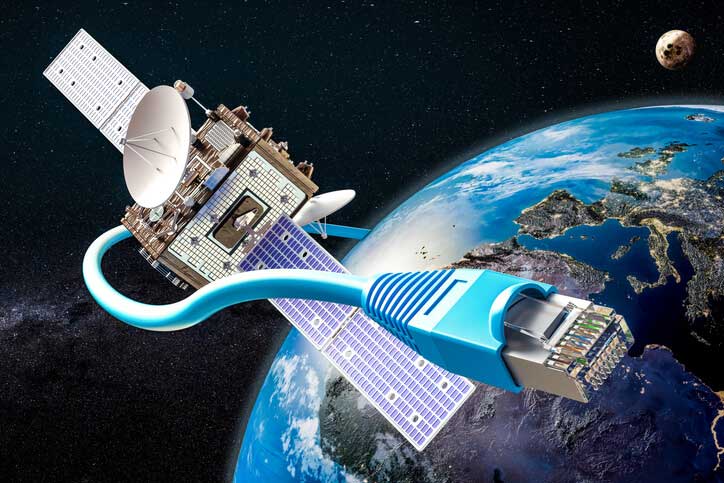
Starlink solves a problem that has plagued modern broadband for years: how to reach rural and remote users who aren’t accessible to traditional cable and fiber internet.
What is Starlink?
Starlink is the satellite internet service from Elon Musk’s company SpaceX.
Starlink provides coverage to around 150 countries and territories. It also aims to provide global mobile broadband. Starlink has been instrumental to SpaceX’s growth. It offers broadband internet service almost anywhere that has a clear view of the sky, making fast, reliable access available in remote areas that may never get traditional services like cable or fiber.
SpaceX began launching Starlink satellites in 2019. As of May 2025, the constellation consists of over 7,600 mass-produced satellites in low Earth orbit (LEO) that communicate with designated ground transceivers. Since their satellites orbit lower it reduces latency, making your Internet Service more responsive.
Coverage
The best thing about Starlink, by far, is the coverage. It’s available virtually anywhere in the world, as long as you have a clear view of the sky. Their constellation of over 7,000 satellites provides global coverage, allowing people in rural and remote areas to finally have access to high-speed internet.
If you’re one of the millions of Americans living in an area without high-speed broadband from major internet service providers (ISPs) like Comcast Xfinity, Cox, Verizon Fios, or AT&T Fiber, you may find yourself needing fast internet for school, work, or entertainment, but having very few options. Dialup Internet or DSL maxes out at 5 Mbps download, and 1 Mbps up.
Starlink, in that case, is your best alternative.
Contracts and Commitments
Another great thing about Starlink is that they don’t have any contracts or commitments. With Satellite Internet options like Viasat and HughesNet trying to cancel and get out of their two year contracts may cost you hundreds of dollars.
Starlink is completely different than most ISP’s. They are very upfront and transparent about their pricing. You pay for the equipment, which you then own outright. You also pay each month for the service, which you are free to cancel without fees at any time.
How it Works
Most satellite internet services obtain signals from a single geostationary satellite orbiting around 35,678 km above the Earth. Starlink works differently. Instead of a single high-orbit satellite, it uses a network of thousands of smaller low-Earth orbit (LEO) satellites launched by SpaceX at only about 550km above the planet.
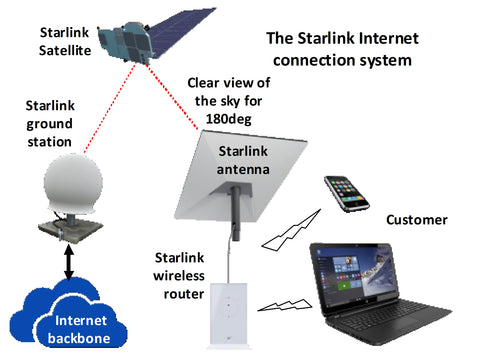
Since Starlink satellites are closer it reduces the latency time to between 25 and 60 milliseconds, making it possible to stream and game online without annoying delays. The thousands of satellites are all linked, so there should almost always be a satellite in your line of sight, reducing the possibility of downtime.
How Does Starlink Connect to Your House?
Starlink uses satellites to transmit wireless signals to your receiver, which you then connect to a Wi-Fi router to deliver internet wirelessly anywhere in your home.
Connecting Starlink to your house is easy. Simply mount the dish outdoors with a clear view of the northern sky. It will come with a long cable to connect your dish to the Wi-Fi router, which you will place in a central location in your home. Then, connect your phones, tablets, computers, TVs, etc, to your Wi-Fi router.
Internet data is first transmitted from ground stations to the LEO satellites when you use it. From there, your dish transmits signals back and forth to satellites rapidly passing overhead. They use a phased array that connects from one satellite to the next simultaneously to ensure uninterrupted connections, depending on your location.
When you request a connection (e.g., to stream a video), it is routed through your dish to the LEO, which transmits it to the ground station, back to the LEO array, and back to your dish. With low latency times in the 20 – 50ms range, you can stream videos without the annoying delays seen with high-orbit satellites.
Traveling with Starlink
To use Starlink away from home, you need a Starlink Roam (Mobile/RV) plan, not standard Residential, allowing you to pack up and set it up in different locations, using the app to find obstructions and set up, while your devices connect to the Starlink Wi-Fi network just like at home.
Key Options for Travel
- Starlink Roam: Designed for portability, allowing you to use your service in your home country and internationally (in supported regions) with flexible plans you can pause, perfect for RVs, campers, and digital nomads.
- Starlink Mini: A super-compact, backpack-friendly dish with its own router, lower power needs, and DC input, ideal for quick, on-the-go setups with good speeds (over 100 Mbps) and international availability in live markets.
How Fast Is Starlink?
This is the big question. Starlink averages around 150 Mbps globally, but speeds vary by location. In Australia, speeds range from 20 to 100 Mbps, with latency of 25 to 50 ms.
Starlink Plans
Starlink Residential Lite is a cheaper, deprioritized version of the standard Residential plan, offering lower speeds (around 45-130 Mbps) during peak congestion for a lower monthly fee, ideal for lighter users or less congested areas, while the full Residential plan offers faster, higher-priority speeds (100-270+ Mbps) for heavier users, both providing unlimited data but differing in network priority.
The core distinction is priority: Lite users get lower priority, meaning their speeds slow down when more people in the area are online, whereas standard Residential users have priority for faster speeds. You can often switch between plans if needed, starting with Lite and upgrading if congestion becomes an issue.
| Features: | Residential | Residential Lite | ROAM - UNLIMITED | ROAM - 50GB |
|---|---|---|---|---|
| Fees | $120/Mo. | $80/Mo. | $165/Mo. | $50/Mo. |
| Speeds | 100-270+ Mbps - Faster and more consistent | 45-130 Mbps - Slower speeds during peak network hours. | 45-230 Mbps | 45-230 Mbps; speeds slow after 50G cap |
| Data | Unlimited | Unlimited but “deprioritized” data | Unlimited mobile data. | 50GB of mobile data; you can buy more in GB increments. |
| Usage | Larger households, heavy users, streaming and gaming. | Smaller households, lower usage, saving money. | Frequent travelers, RVers, campers, working on the go. | For occasional trips, camping, and getaways. |
| Features | Plug & Play Setup >99.9% Uptime Weather Resilient Unlimited Data 30-Day Trial | Plug & Play Setup >99.9% Uptime Weather Resilient Unlimited Data 30-Day Trial | Plug & Play Setup In-motion Use Works Anywhere in 150+ Countries & Territories Pause Anytime with Standby Mode 30-Day Trial | Plug & Play Setup In-motion Use Works Anywhere in 150+ Countries & Territories Pause Anytime with Standby Mode 30-Day Trial |
“Residential” – $120/mo.:
Starlink Residential is Starlink’s primary satellite internet plan for homes, offering unlimited data for streaming, gaming, and video calls at a fixed location. Speeds: Faster and more consistent (e.g., 100-270+ Mbps download).
“Residential Lite” – $80/mo.:
Starlink Residential Lite is a more affordable, slower version of Starlink’s standard home internet, offering unlimited but “deprioritized” data, meaning slower speeds during peak network hours in exchange for a lower monthly cost. It’s designed for smaller households with lower usage. Speeds: (e.g., 45-130 Mbps download).
Both Include:
-
- Plug & Play Setup
- >99.9% Uptime
- Weather Resilient
- Unlimited Data
- 30-Day Trial
Best for RVs, nomads, and campers, and working on the go.
- ROAM – 50GB – $50/mo
- ROAM – UNLIMITED – $165/mo
Typical Speed Ranges depending on location, time of day, and network congestion:
- Download: 45 Mbps to over 200 Mbps,
- Upload: 15-35 Mbps
- Plug & Play Setup
- In-motion Use
- Works Anywhere in 150+ Countries & Territories
- Pause Anytime with Standby Mode
- 30-Day Trial
What Equipment Do I Need To Connect to Starlink?
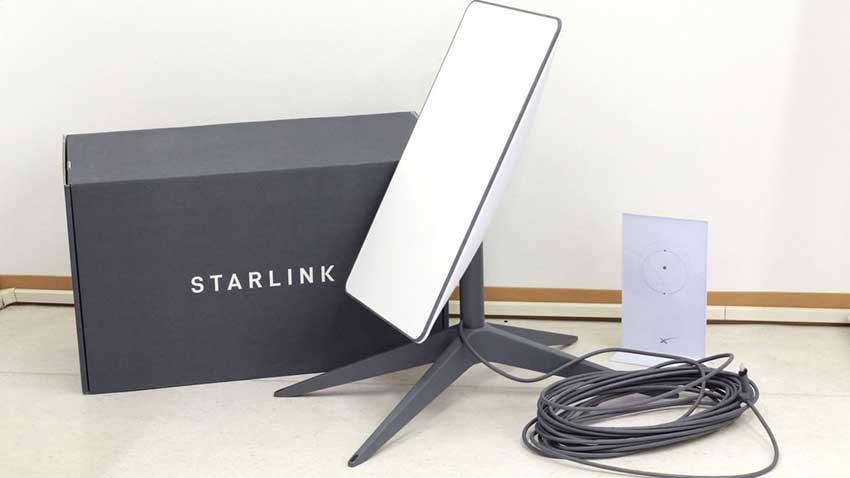
for setup, but for more features like wired internet, you might need optional accessories like the Ethernet Adapter or specific mounts, with the Mini kit integrating the router for ultimate portability.
- Starlink Dish: The satellite antenna that connects to the network
- Wi-Fi Router: Broadcasts the Wi-Fi signal (Note: Mini, Performance, and Enterprise models may not include it).
- Cables: The Starlink Cable (dish to router) and AC Power Cable (router to wall).
- Mount: A basic kickstand or tripod for initial setup.
- Starlink App: Required on a smartphone for setup, obstruction checking, and management.
There are two main kits for connecting to the Starlink network are the Starlink Standard, and the Starlink mini. The Starlink Standard comes with everything you need to get online in minutes. The dish is the latest iteration of Starlink’s standard dish model and is the recommended hardware for home internet. In contrast, the Starlink Mini is a portable, lightweight dish about the size of a laptop, designed for on-the-go use. It has a built-in Wi-Fi router but cannot be used with fixed residential plans.